Author
James Little/Mass Spec Interpretation Services
My main interest is the identification of organic compounds by mass spectrometry in organic mixtures.
Tags
Article
Academy
Video
Software
LinkedIn Logo

Raw Data Files for EI Low Resolution in the Identifications Folder
Tu, 14.7.2026
| Original article from: Mass Spec Interpretation Services/James Little
Discover what the NIST Identification Folder contains during low-resolution EI GC-MS processing. Learn how TIC, ELU, FIN, TSV, RUN, and LOG files support deconvolution and library searching.
Video placeholder
  • Photo: James Little: Raw Data Files for EI Low Resolution in the Identifications Folder
  • Video: James Little: Raw Data Files for EI Low Resolution in the Identifications Folder

How Deconvolution Output Files Support Library Searching, Method Validation, and Sample Comparison

Electron ionization (EI) GC-MS library searching has traditionally been viewed as a straightforward process: acquire a chromatogram, search spectra against a library, and identify compounds. However, modern NIST software performs a much more sophisticated workflow behind the scenes.

During processing, NIST creates an Identification Folder containing a collection of intermediate files that document every stage of chromatographic interpretation—from the original total ion chromatogram through component detection, spectral deconvolution, and final library searching. Although most users never open these files, they provide valuable insight into how identifications are generated and may even serve as the foundation for advanced comparison workflows.

You can download PDF Handout for this guide HERE

Why Does NIST Generate These Files?

When processing low-resolution EI GC-MS data, the software performs much more than simple spectrum matching.

Instead, it follows a sequential workflow:

  • Raw chromatographic data acquisition
  • Detection of chromatographic components
  • Separation (deconvolution) of overlapping spectra
  • Generation of one clean spectrum for each chemical component
  • Library searching against the NIST database
  • Reporting of final identifications

Rather than storing only the final results, NIST saves intermediate processing files that document each stage of the workflow. Together, these files form a complete processing record and improve both transparency and reproducibility.

The Low-Resolution EI GC-MS Processing Workflow
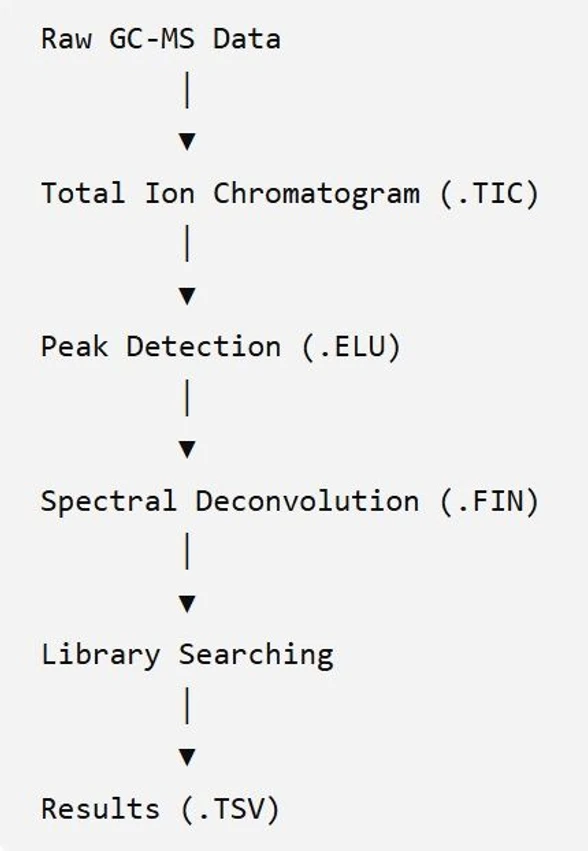
James Little: The Low-Resolution EI GC-MS Processing WorkflowJames Little: The Low-Resolution EI GC-MS Processing Workflow

Additional files (.RUN and .LOG) preserve processing parameters and document every computational step performed during analysis.

Understanding Each File

1. .TIC – Total Ion Chromatogram

The TIC file contains the complete chromatographic signal collected during the GC-MS analysis.

It represents the familiar chromatogram displayed in the software interface and serves as the starting point for all subsequent processing.

Purpose
  • Stores the raw chromatographic signal
  • Displays detector response versus retention time
  • Provides the visual overview of the analysis

Although essential for evaluating chromatography, the TIC alone does not distinguish overlapping compounds. That task is handled during deconvolution.

2. .ELU – Component Detection

Once the chromatogram has been acquired, NIST identifies potential chromatographic components.

The ELU file records this information.

Typical information includes:

  • Peak start and end times
  • Peak apex positions
  • Elution profiles
  • Grouped ion traces

This stage determines where individual compounds are likely present before spectral deconvolution begins.

3. .FIN – Deconvoluted Spectra

The FIN file is arguably the most important intermediate product.

Rather than storing every acquired scan, NIST creates one clean spectrum for each resolved chromatographic component.

Each spectrum has:

  • Reduced interference from co-eluting compounds
  • Cleaner fragment ion distributions
  • Improved suitability for library searching

These spectra become the actual inputs used during library matching.

4. .TSV – Tabulated Results

The TSV file contains the processed results in a tab-delimited format suitable for export and further analysis.

Typical contents include:

  • Retention times
  • Compound identifications
  • Match factors
  • Peak intensities
  • Library search results

Because the information is already organized into tables, this file is particularly useful for reporting and external data analysis.

5. .RUN – Processing Parameters

The RUN file documents the analytical method used during processing.

Typical information includes:

  • Deconvolution settings
  • Peak detection thresholds
  • Library search options
  • Processing parameters

Maintaining these settings is essential for reproducible analyses and consistent comparison between datasets.

6. .LOG – Processing Record

The LOG file serves as the computational audit trail.

It records:

  • Processing activity
  • Number of spectra analyzed
  • Library search operations
  • Timing information

In the example shown in the presentation, the log indicates that:

  • 91 spectra were processed
  • Approximately 178,000 library comparisons were performed

This confirms successful completion of both deconvolution and library searching.

A Key Concept: NIST Does Not Search Every Scan

One of the most important insights presented is that NIST does not perform library searches on every individual mass spectrum acquired during a GC-MS run.

Instead, the software first performs spectral deconvolution to isolate chemically meaningful components.

Only these cleaned component spectra are submitted for library searching.

This dramatically reduces computational complexity while simultaneously improving identification accuracy by minimizing interference from overlapping chromatographic peaks.

Can These Files Be Used for Sample Comparison?

Beyond routine identification, the presentation highlights an interesting possibility: using the generated output files for comparative analyses between samples.

Among the available files, the TSV file is the most practical starting point because it already contains structured analytical results.

Potential comparisons include:

  • Compounds present in one sample but absent in another
  • Relative peak intensity differences
  • Changes in compound abundance
  • New or missing deconvoluted components
  • Differences in library match scores

For more advanced investigations:

  • FIN files enable direct comparison of deconvoluted spectra.
  • ELU files allow comparison of chromatographic behavior and peak shapes.
  • TIC files provide an overall chromatographic overview but are less suitable for compound-level comparisons.

Opportunities for Advanced Data Analysis

Because these files contain structured intermediate processing data, they may also support custom computational workflows outside the NIST environment.

Possible applications include:

  • Principal Component Analysis (PCA)
  • Batch quality control
  • Good vs. bad sample classification
  • Manufacturing process monitoring
  • Trend analysis across multiple GC-MS runs
  • Custom statistical or machine learning workflows

Although NIST itself does not perform these analyses, the exported files provide a valuable foundation for external software and user-developed applications.

Best Practices

When working with NIST Identification Folder files:

  • Use the TIC file for evaluating chromatographic performance.
  • Examine the ELU file to understand component detection.
  • Rely on the FIN file for studying deconvoluted spectra.
  • Use the TSV file for reporting, exporting, and comparative studies.
  • Preserve the RUN file to ensure reproducibility.
  • Review the LOG file whenever processing quality needs verification.

Together, these files provide complete documentation of the identification workflow and offer far more information than the final library search results alone.

Conclusion

The Identification Folder generated during NIST low-resolution EI GC-MS processing is much more than a collection of temporary files. It represents a comprehensive record of the entire analytical workflow, from raw chromatographic data through deconvolution and library searching. Understanding the role of each file helps users interpret results with greater confidence, troubleshoot processing steps, and explore advanced applications such as sample comparison, chemometric analysis, and custom data processing workflows. Rather than being hidden implementation details, these files can become valuable resources for improving transparency, reproducibility, and analytical insight in GC-MS data analysis.

James Little/Mass Spec Interpretation Services
LinkedIn Logo
 

Related content

Is Your Next Sip Safe? A Simple, Rapid Method for Measuring volatile PFAS in Juices.

Posters
| 2026 | Shimadzu (ASMS)
Instrumentation
GC/MSD, GC/MS/MS, GC/QQQ, HeadSpace
Manufacturer
Shimadzu
Industries
Food & Agriculture

Thermo Scientific™ Orbitrap Exploris™ GC S Mass Spectrometer

Brochures and specifications
| 2026 | Thermo Fisher Scientific
Instrumentation
GC/MSD, GC/MS/MS, GC/Orbitrap, GC/HRMS
Manufacturer
Thermo Fisher Scientific
Industries
Other

Operational efficiency for your GC and GC/MS labs with the Agilent 8860B gas chromatography system

Brochures and specifications
| 2026 | Agilent Technologies
Instrumentation
GC
Manufacturer
Agilent Technologies
Industries
Other

Agilent 8890B Gas Chromatograph

Brochures and specifications
| 2026 | Agilent Technologies
Instrumentation
GC
Manufacturer
Agilent Technologies
Industries
Other

Agilent 8860B Gas Chromatograph

Brochures and specifications
| 2026 | Agilent Technologies
Instrumentation
GC
Manufacturer
Agilent Technologies
Industries
Other
 

Related articles

Configuring and Navigating Chromatogram Window NIST26
Article | Academy

Configuring and Navigating Chromatogram Window NIST26

Learn how to configure, customize, and navigate the new NIST 26 Chromatogram Window. This practical guide covers layouts, zooming, filtering, structure display, and efficient data review workflows.
James Little/Mass Spec Interpretation Services
tag
share
more
Processing EI GC-MS Data in Chromatogram Window NIST26
Article | Academy

Processing EI GC-MS Data in Chromatogram Window NIST26

Learn how to process EI GC-MS data in NIST 26 using integrated AMDIS deconvolution, library searching, filtering, spectral review, and Excel reporting for confident compound identification.
James Little/Mass Spec Interpretation Services
tag
share
more
Processing of Accurate Mass GC-MS with NIST26 Chromatogram
Article | Academy

Processing of Accurate Mass GC-MS with NIST26 Chromatogram

Learn how to process accurate-mass GC-MS data in NIST 26 using integrated deconvolution, library searching, MS Interpreter validation, filtering tools, and Excel reporting workflows.
James Little/Mass Spec Interpretation Services
tag
share
more
RI Calibration in NIST26 Chromatogram and Applying to Calculating RI in Samples
Article | Academy

RI Calibration in NIST26 Chromatogram and Applying to Calculating RI in Samples

Learn how to create retention index calibrations in NIST 26, calculate RI values automatically, and improve GC-MS compound identification by combining spectral library searching with retention indices.
James Little/Mass Spec Interpretation Services
tag
share
more
 

Related content

Is Your Next Sip Safe? A Simple, Rapid Method for Measuring volatile PFAS in Juices.

Posters
| 2026 | Shimadzu (ASMS)
Instrumentation
GC/MSD, GC/MS/MS, GC/QQQ, HeadSpace
Manufacturer
Shimadzu
Industries
Food & Agriculture

Thermo Scientific™ Orbitrap Exploris™ GC S Mass Spectrometer

Brochures and specifications
| 2026 | Thermo Fisher Scientific
Instrumentation
GC/MSD, GC/MS/MS, GC/Orbitrap, GC/HRMS
Manufacturer
Thermo Fisher Scientific
Industries
Other

Operational efficiency for your GC and GC/MS labs with the Agilent 8860B gas chromatography system

Brochures and specifications
| 2026 | Agilent Technologies
Instrumentation
GC
Manufacturer
Agilent Technologies
Industries
Other

Agilent 8890B Gas Chromatograph

Brochures and specifications
| 2026 | Agilent Technologies
Instrumentation
GC
Manufacturer
Agilent Technologies
Industries
Other

Agilent 8860B Gas Chromatograph

Brochures and specifications
| 2026 | Agilent Technologies
Instrumentation
GC
Manufacturer
Agilent Technologies
Industries
Other
 

Related articles

Configuring and Navigating Chromatogram Window NIST26
Article | Academy

Configuring and Navigating Chromatogram Window NIST26

Learn how to configure, customize, and navigate the new NIST 26 Chromatogram Window. This practical guide covers layouts, zooming, filtering, structure display, and efficient data review workflows.
James Little/Mass Spec Interpretation Services
tag
share
more
Processing EI GC-MS Data in Chromatogram Window NIST26
Article | Academy

Processing EI GC-MS Data in Chromatogram Window NIST26

Learn how to process EI GC-MS data in NIST 26 using integrated AMDIS deconvolution, library searching, filtering, spectral review, and Excel reporting for confident compound identification.
James Little/Mass Spec Interpretation Services
tag
share
more
Processing of Accurate Mass GC-MS with NIST26 Chromatogram
Article | Academy

Processing of Accurate Mass GC-MS with NIST26 Chromatogram

Learn how to process accurate-mass GC-MS data in NIST 26 using integrated deconvolution, library searching, MS Interpreter validation, filtering tools, and Excel reporting workflows.
James Little/Mass Spec Interpretation Services
tag
share
more
RI Calibration in NIST26 Chromatogram and Applying to Calculating RI in Samples
Article | Academy

RI Calibration in NIST26 Chromatogram and Applying to Calculating RI in Samples

Learn how to create retention index calibrations in NIST 26, calculate RI values automatically, and improve GC-MS compound identification by combining spectral library searching with retention indices.
James Little/Mass Spec Interpretation Services
tag
share
more
 

Related content

Is Your Next Sip Safe? A Simple, Rapid Method for Measuring volatile PFAS in Juices.

Posters
| 2026 | Shimadzu (ASMS)
Instrumentation
GC/MSD, GC/MS/MS, GC/QQQ, HeadSpace
Manufacturer
Shimadzu
Industries
Food & Agriculture

Thermo Scientific™ Orbitrap Exploris™ GC S Mass Spectrometer

Brochures and specifications
| 2026 | Thermo Fisher Scientific
Instrumentation
GC/MSD, GC/MS/MS, GC/Orbitrap, GC/HRMS
Manufacturer
Thermo Fisher Scientific
Industries
Other

Operational efficiency for your GC and GC/MS labs with the Agilent 8860B gas chromatography system

Brochures and specifications
| 2026 | Agilent Technologies
Instrumentation
GC
Manufacturer
Agilent Technologies
Industries
Other

Agilent 8890B Gas Chromatograph

Brochures and specifications
| 2026 | Agilent Technologies
Instrumentation
GC
Manufacturer
Agilent Technologies
Industries
Other

Agilent 8860B Gas Chromatograph

Brochures and specifications
| 2026 | Agilent Technologies
Instrumentation
GC
Manufacturer
Agilent Technologies
Industries
Other
 

Related articles

Configuring and Navigating Chromatogram Window NIST26
Article | Academy

Configuring and Navigating Chromatogram Window NIST26

Learn how to configure, customize, and navigate the new NIST 26 Chromatogram Window. This practical guide covers layouts, zooming, filtering, structure display, and efficient data review workflows.
James Little/Mass Spec Interpretation Services
tag
share
more
Processing EI GC-MS Data in Chromatogram Window NIST26
Article | Academy

Processing EI GC-MS Data in Chromatogram Window NIST26

Learn how to process EI GC-MS data in NIST 26 using integrated AMDIS deconvolution, library searching, filtering, spectral review, and Excel reporting for confident compound identification.
James Little/Mass Spec Interpretation Services
tag
share
more
Processing of Accurate Mass GC-MS with NIST26 Chromatogram
Article | Academy

Processing of Accurate Mass GC-MS with NIST26 Chromatogram

Learn how to process accurate-mass GC-MS data in NIST 26 using integrated deconvolution, library searching, MS Interpreter validation, filtering tools, and Excel reporting workflows.
James Little/Mass Spec Interpretation Services
tag
share
more
RI Calibration in NIST26 Chromatogram and Applying to Calculating RI in Samples
Article | Academy

RI Calibration in NIST26 Chromatogram and Applying to Calculating RI in Samples

Learn how to create retention index calibrations in NIST 26, calculate RI values automatically, and improve GC-MS compound identification by combining spectral library searching with retention indices.
James Little/Mass Spec Interpretation Services
tag
share
more
 

Related content

Is Your Next Sip Safe? A Simple, Rapid Method for Measuring volatile PFAS in Juices.

Posters
| 2026 | Shimadzu (ASMS)
Instrumentation
GC/MSD, GC/MS/MS, GC/QQQ, HeadSpace
Manufacturer
Shimadzu
Industries
Food & Agriculture

Thermo Scientific™ Orbitrap Exploris™ GC S Mass Spectrometer

Brochures and specifications
| 2026 | Thermo Fisher Scientific
Instrumentation
GC/MSD, GC/MS/MS, GC/Orbitrap, GC/HRMS
Manufacturer
Thermo Fisher Scientific
Industries
Other

Operational efficiency for your GC and GC/MS labs with the Agilent 8860B gas chromatography system

Brochures and specifications
| 2026 | Agilent Technologies
Instrumentation
GC
Manufacturer
Agilent Technologies
Industries
Other

Agilent 8890B Gas Chromatograph

Brochures and specifications
| 2026 | Agilent Technologies
Instrumentation
GC
Manufacturer
Agilent Technologies
Industries
Other

Agilent 8860B Gas Chromatograph

Brochures and specifications
| 2026 | Agilent Technologies
Instrumentation
GC
Manufacturer
Agilent Technologies
Industries
Other
 

Related articles

Configuring and Navigating Chromatogram Window NIST26
Article | Academy

Configuring and Navigating Chromatogram Window NIST26

Learn how to configure, customize, and navigate the new NIST 26 Chromatogram Window. This practical guide covers layouts, zooming, filtering, structure display, and efficient data review workflows.
James Little/Mass Spec Interpretation Services
tag
share
more
Processing EI GC-MS Data in Chromatogram Window NIST26
Article | Academy

Processing EI GC-MS Data in Chromatogram Window NIST26

Learn how to process EI GC-MS data in NIST 26 using integrated AMDIS deconvolution, library searching, filtering, spectral review, and Excel reporting for confident compound identification.
James Little/Mass Spec Interpretation Services
tag
share
more
Processing of Accurate Mass GC-MS with NIST26 Chromatogram
Article | Academy

Processing of Accurate Mass GC-MS with NIST26 Chromatogram

Learn how to process accurate-mass GC-MS data in NIST 26 using integrated deconvolution, library searching, MS Interpreter validation, filtering tools, and Excel reporting workflows.
James Little/Mass Spec Interpretation Services
tag
share
more
RI Calibration in NIST26 Chromatogram and Applying to Calculating RI in Samples
Article | Academy

RI Calibration in NIST26 Chromatogram and Applying to Calculating RI in Samples

Learn how to create retention index calibrations in NIST 26, calculate RI values automatically, and improve GC-MS compound identification by combining spectral library searching with retention indices.
James Little/Mass Spec Interpretation Services
tag
share
more
Other projects
LCMS
ICPMS
Follow us
FacebookX (Twitter)LinkedInYouTube
More information
WebinarsAbout usContact usTerms of use
LabRulez s.r.o. All rights reserved. Content available under a CC BY-SA 4.0 Attribution-ShareAlike